


WiFi 7 is the newest Wi-Fi standard, officially called 802.11be, and it was certified in 2024. It focuses on higher speed, lower latency, and better performance when many devices are online at once. In simple words, it is Wi-Fi built for busy homes where phones, laptops, TVs, consoles, and smart devices all want attention at the same time.
You can think of it as a smarter road system for your home network. WiFi 7 lets more traffic move at once, gives devices better routes, and cuts small delays that make calls or games feel less smooth.
What WiFi 7 actually is
Every Wi-Fi generation has a technical name and a simpler public name. WiFi 7 is the friendly name for IEEE 802.11be. The Wi-Fi Alliance started certifying WiFi 7 products in early 2024, so buyers could look for devices tested against the same standard.
WiFi 7 works on the 2.4 GHz, 5 GHz, and 6 GHz bands, depending on the router, device, and local rules. The 2.4 GHz band reaches farther but is slower. The 5 GHz band is faster with less range. The 6 GHz band is cleaner and roomier, but it also struggles more with walls and distance.
The main point is not just a bigger speed number. WiFi 7 is meant to keep a network responsive when several people are streaming, downloading, gaming, and joining video calls at the same time.
What is new compared with WiFi 6 and WiFi 6E
WiFi 7 builds on WiFi 6 and WiFi 6E instead of starting from scratch. A few upgrades matter more than the marketing claims.
Wider 320 MHz channels
Channel width is a bit like lane width. A wider channel can carry more data in the same moment. WiFi 6 and WiFi 6E go up to 160 MHz channels. WiFi 7 can use 320 MHz channels in the 6 GHz band.
That sounds great, and it can be. The catch is space. A 320 MHz channel needs a large clean block of airwaves. In a quiet area, your router may use it well. In a crowded apartment building, it may pick a narrower channel to stay stable.
4K QAM packs in more data
WiFi 7 uses 4096 QAM, often called 4K QAM. WiFi 6 uses 1024 QAM. QAM is a way of packing information into a radio signal, so higher QAM can carry more data per signal.
When the signal is strong, 4K QAM can raise speed by roughly 20 percent. It works best near the router. Move into another room, add walls, and the connection may step down to a lower rate to stay reliable.
Multi-Link Operation is the biggest real change
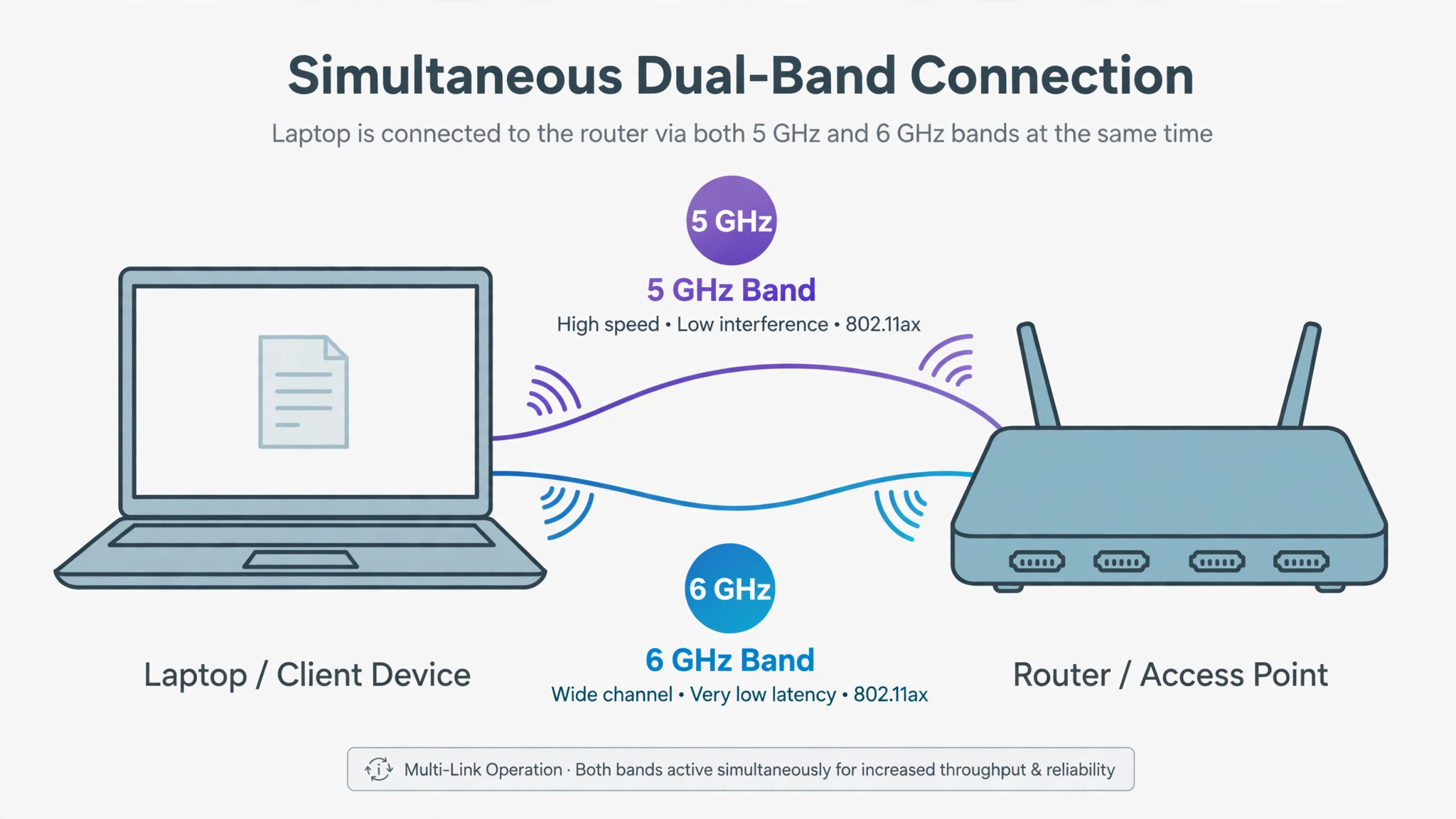
Multi-Link Operation, or MLO, is the feature that makes WiFi 7 feel different. Older Wi-Fi usually connects a device through one band at a time. With MLO, a WiFi 7 device can send and receive data over more than one link, or switch links quickly when one gets busy.
Picture two delivery routes instead of one. If one route slows down, the other can help. MLO can improve speed, but its best benefit may be lower delay and steadier performance. That matters for gaming, VR, video calls, and cloud apps, where a short pause can be more annoying than a small dip in download speed.
The 46 Gbps number, explained honestly
WiFi 7 has a theoretical top speed of about 46 Gbps. That figure assumes ideal lab conditions, very wide channels, many antennas, strong signal, and high end hardware. It is useful for comparing standards, but it is not a promise for your home.
Your real speed depends on your internet plan, router, device, distance, walls, interference, and how many people are online. If your broadband plan is 300 Mbps, WiFi 7 cannot turn it into gigabit internet. It can improve local transfers and busy moments inside your home, but it cannot make your provider faster than the plan you pay for.
WiFi 5, WiFi 6, WiFi 6E and WiFi 7 compared
| Standard | Max theoretical speed | Bands used | Widest channel |
|---|---|---|---|
| WiFi 5 | 3.5 Gbps | 5 GHz | 160 MHz |
| WiFi 6 | 9.6 Gbps | 2.4 GHz, 5 GHz | 160 MHz |
| WiFi 6E | 9.6 Gbps | 2.4 GHz, 5 GHz, 6 GHz | 160 MHz |
| WiFi 7 | 46 Gbps | 2.4 GHz, 5 GHz, 6 GHz | 320 MHz |
WiFi 6E still deserves credit because it opened the 6 GHz band. WiFi 7 uses that same space more aggressively with wider channels and MLO.

Do you need WiFi 7?
For most people, WiFi 7 is a smart next purchase, not an urgent one. The right answer depends on what you already own and what actually feels slow.
You are more likely to benefit if you are buying a new router anyway. If your current router is old, unreliable, or no longer receiving security updates, a good WiFi 7 model can be a sensible long term choice. You may not use every feature today, but your next phone or laptop may support it.
Gamers, VR users, and busy households may notice the gains sooner. Lower latency and better link handling can help when several devices are active at once. A home with 4K streaming, large game downloads, cloud backups, and daily video calls gives WiFi 7 more chances to prove itself.
You can skip it if your WiFi 6 or WiFi 6E network already works well. Clear calls, stable streaming, and responsive games are good signs. In that case, better router placement, a mesh system, or an Ethernet cable for a desk or console may help more for less money.
One catch matters. Both the router and the device need WiFi 7 to use WiFi 7 features. A new router will still work with older devices, because Wi-Fi is backward compatible. Those devices simply connect with the older standard they support, so they do not get the new speed or MLO benefits.
What you need to upgrade
Start with the router. Choose a Wi-Fi CERTIFIED 7 model that fits your home size and supports the bands allowed in your country. A single router can suit a small flat. A larger home may need mesh WiFi, where several units work together for better coverage.
Next, check your devices. Many recent flagship phones and premium laptops support WiFi 7, while plenty of budget models still use WiFi 6 or WiFi 5. If you are shopping for a computer too, our guide on what an AI PC is is a useful companion, because Wi-Fi support belongs on the same checklist as the chip, memory, and battery.
Also test your internet connection before blaming Wi-Fi. Try a wired test if you can. If wired speed is good but wireless drops in certain rooms, you have a coverage problem. If wired speed is poor too, speak to your provider or review your plan first.
Placement still matters. Put the router in the open, away from thick metal objects, and as central as possible. A powerful router hidden behind a TV will still struggle. For official details on the standard, see the Wi-Fi Alliance WiFi CERTIFIED 7 page.
Frequently asked questions
Is WiFi 7 faster than WiFi 6?
Yes. WiFi 7 can be much faster, especially with a WiFi 7 router, a WiFi 7 device, a strong signal, and the 6 GHz band. The real gain will be smaller if your internet plan is slow or your device only supports WiFi 6.
Is WiFi 7 worth it in 2026?
It is worth it if you need a new router, want lower latency for games or VR, or run a busy home network. If your WiFi 6 setup feels stable, waiting is fine. More supported devices and lower prices will make the upgrade easier later.
Does WiFi 7 improve range?
Not really. WiFi 7 is mainly about speed, capacity, and latency. The 6 GHz band can be weaker through walls than 2.4 GHz. For dead zones, better placement or a mesh system usually helps more.
Will WiFi 7 work with old devices?
Yes. WiFi 7 routers work with older phones, laptops, TVs, and smart home gear. Those older devices connect normally, but they do not get WiFi 7 features because their own hardware does not support them.
When did WiFi 7 come out?
Wi-Fi CERTIFIED 7 launched in January 2024. Some products appeared earlier using draft technology, but certification gave buyers a clearer label. Support then spread through newer phones, laptops, and routers during 2024 and 2025.
Final take
WiFi 7 is a genuine step forward, mostly because MLO, wider channels, and better handling of crowded networks make wireless feel quicker and calmer. It is not magic, and it will not rescue a slow plan or a badly placed router. Buy it when you need new networking gear and plan to keep it for years. If your current setup already does its job, waiting is perfectly sensible. The pattern is similar to other recent tech shifts covered in our beginner guide to AI agents: the best upgrade is the one that solves a problem you actually have.